Successful Solutions Professional Development LLC
  • Unit 6 Home Page
    • About Us
    • About the Trainers
    • Blog
    • CDA Credentialing Process
    • CDA Success Stories
    • CDA Course Synopses
    • What is a CDA?
  • Enroll Now
  • Student Log-In
  • Contact Us
  • Virtual Classroom
    • Unit 1
    • Unit 2
    • Unit 3
    • Unit 4
    • Unit 5
    • Unit 6
    • Unit 7
    • Unit 8
Sentry Page Protection
Please Wait...
Unit 6 Student Login  Unit 6 Student Login Hi, (First Name) Member Area | Log Out
Member Login
Welcome, (First Name)!

Forgot? Show
Log In
Enter Member Area
(Message automatically replaces this text)
OK
My Profile Log Out

(Unit 6) Topic 1: A Teacher’s Guide to Pinterest

1 Clock Hour of Early Childhood Education
Using Pinterest for Your Classroom

​Topic 1 Page 8

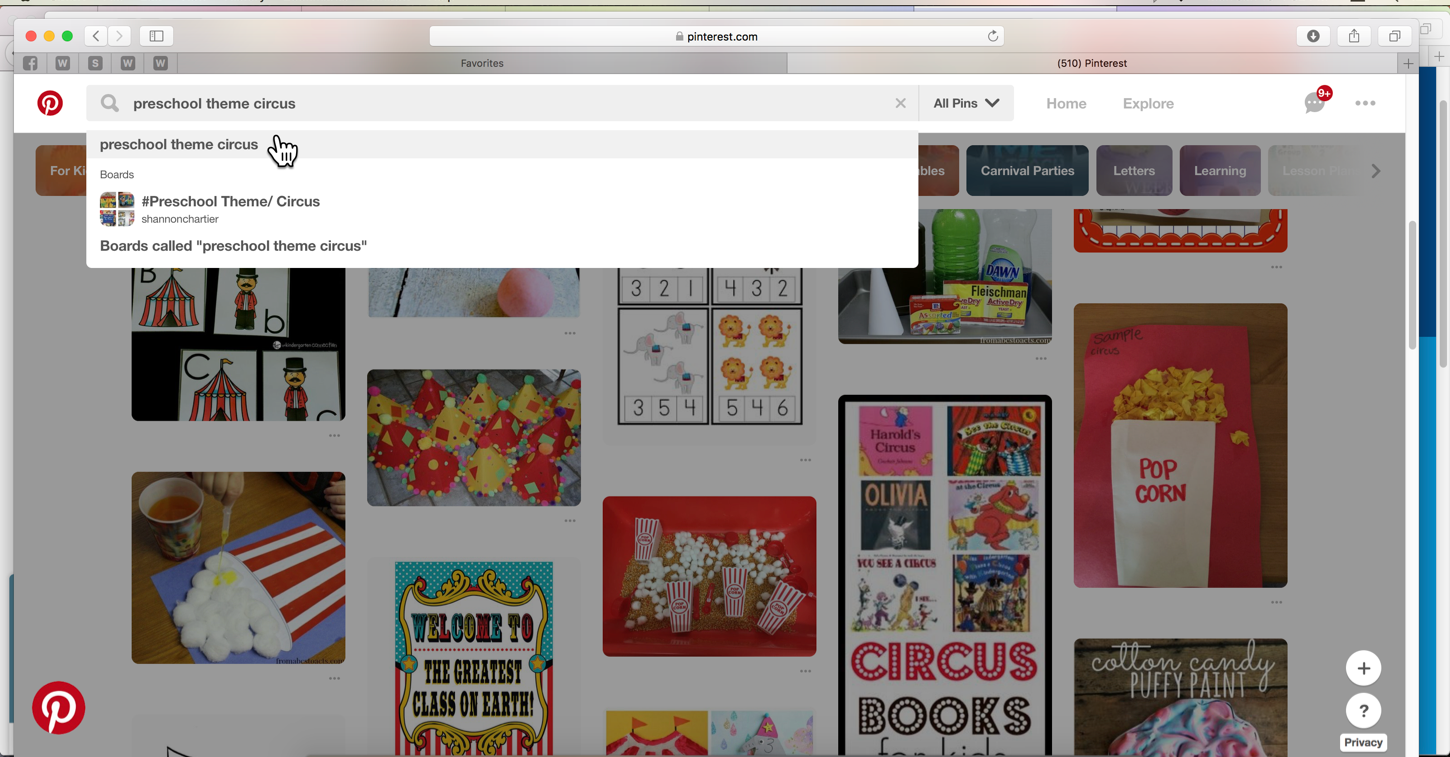
It’s common to feel overwhelmed with all the ideas and projects available on Pinterest. Narrowing down the information you are presented with is all based on how you choose to search.

Let’s say an upcoming theme for your classroom is the circus, and you want to find some new activities. Instead of just typing “circus activities” into the search bar, be sure to include the age group you are working with. Including an audience in your search will give you more age-appropriate options to choose from.
Optional Youtube Video: Pinterest: Introducing Guided Search
Picture
It is imperative that teachers keep standards and developmental milestones in mind when browsing for lesson plans. Standards describe what students are expected to know by the end of their time with you. Developmental milestones map out what physical skills and behaviors children should be showing according to age. Aligning appropriate standards and milestones with the activities you present will ensure students are learning suitable material.

We have provided resource links below for you to refresh your knowledge of standards and milestones.
Picture
  • Common Core Standards
  • Developmental Milestones, Centers for Disease Control and Prevention
  • How Teachers Collaborate Using Pinterest​
  • There’s a Big Hole in How Teachers Build Skills, and Pinterest Is Helping Fill It, by Madeleine Cummings
  • 16 Best Teacher Pinterest Pages to Obsess Over, We Are Teachers, Meghan Mathis on June 2, 2017 
Ways to Use Pinterest
  • Lesson Plans : An array of lesson plans are available to be adapted to meet your classroom’s specific needs.
  • Class Management: Browse for tips and tricks for making your classroom run smoother.
  • Classroom Décor: There are tons of ideas for making your classroom more inviting and esthetically pleasing. You and your students will spend hundreds of hours each year in your classroom. Why not make it as comfortable as possible?
  • Bulletin Boards : A clever bulletin board is a great way to display your student’s work and get them excited for learning.
  • Classroom Organization: Let’s face it, every teacher struggles with keeping their room together. There are a myriad of ways to help with the daily organization of your classroom on Pinterest.
  • Virtual Field Trips: Using your Pinterest account with a Smartboard can take your students places you may not ordinarily be able to. These field trips are less expensive and less time-consuming as well. ​
  • Connect with other child care providers: Following other educators will keep you informed on what they are doing in their classrooms. There is also an option for personal messaging other users.
Picture
Picture
(Unit 6) Topic 1: A Teacher’s Guide to Pinterest​ * Navigation Menu
Picture
Picture
Picture
Picture
Picture
Picture
Picture
Picture
Picture
Picture
Picture
Picture
Picture

Successful Solutions Training in Child Development
Address: PO Box 727, Burley, WA 98322-0727  * www.mycdaclass.com
Copyright 2017.  Successful Solutions Professional Development LLC.  * All Rights Reserved. Updated JULY 1, 2017

Successful Solutions Professional Development LLC BBB Business Review

Enrollment Hours

Monday - Friday          7  am – 8  pm 
Saturday & Sunday     9  am – 8  pm
Holidays                       9  am – 8  pm

Telephone

(360) 602-0960 

Email

[email protected]
Registrations that are submitted after enrollment hours will be processed the next morning.  You will receive an email with your log-in information to access the course within an hour after we open the next business day.
  • Unit 6 Home Page
    • About Us
    • About the Trainers
    • Blog
    • CDA Credentialing Process
    • CDA Success Stories
    • CDA Course Synopses
    • What is a CDA?
  • Enroll Now
  • Student Log-In
  • Contact Us
  • Virtual Classroom
    • Unit 1
    • Unit 2
    • Unit 3
    • Unit 4
    • Unit 5
    • Unit 6
    • Unit 7
    • Unit 8